搭建并测试
1. 下载 NG 安装包
点击进入 Nginx 网址,下载安装包
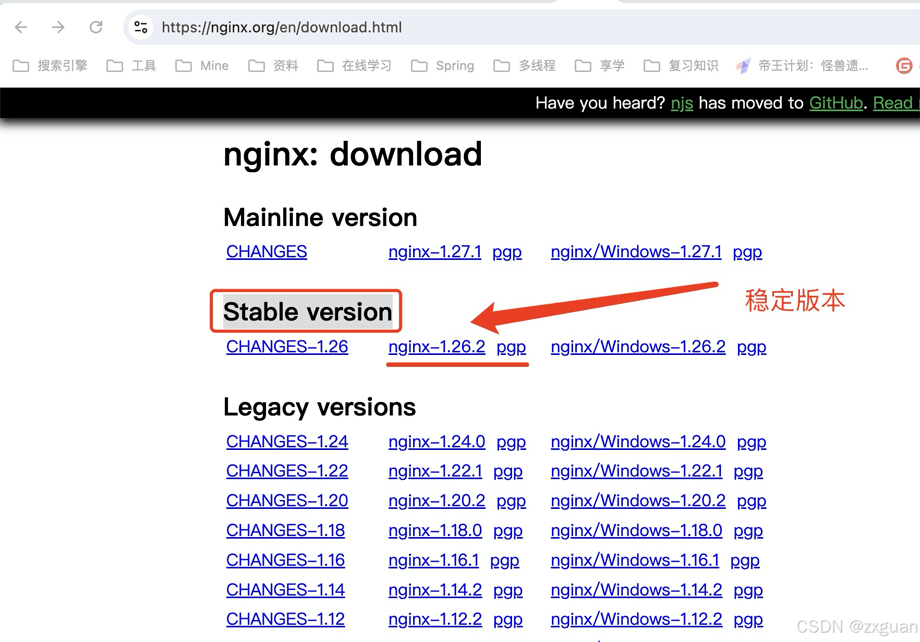
2. 安装编译工具及库文件
yum -y install make zlib zlib-devel gcc-c++ libtool openssl openssl-devel pcre-devel
3. 上传并解压安装包
// 进入指定目录,ftp 上传压缩包

tar -zxvf nginx-1.26.2.tar.gz
4. 编译
./configure --prefix=/usr/local/nginx --with-http_stub_status_module --with-http_ssl_module --with-ipv6
5. 安装
make && make install
6. 修改配置
# 进入 NG 配置文件夹
cd /usr/local/nginx/conf

# 修改 NG 配置文件
vim nginx.conf
http {
	......
    server {
    	......
        listen       80;     	# IPV4
        listen       [::]:80;	# IPV6
		......
    }
	......
}
7. 启动 NG
# 启动 NG
./nginx

# 停止 NG
./nginx -s stop

# 重启 NG
./nginx -s reload
8. 查看 IP 地址
[root@iZf8z6w83m8z8cj3m3lmubZ conf]# ip a
1: lo:  mtu 65536 qdisc noqueue state UNKNOWN group default qlen 1000
    link/loopback 00:00:00:00:00:00 brd 00:00:00:00:00:00
    inet 127.0.0.1/8 scope host lo
       valid_lft forever preferred_lft forever
    inet6 ::1/128 scope host
       valid_lft forever preferred_lft forever
2: eth0:  mtu 1500 qdisc pfifo_fast state UP group default qlen 1000
    link/ether 00:16:3e:0a:74:78 brd ff:ff:ff:ff:ff:ff
    inet 172.18.133.39/20 brd 172.18.143.255 scope global dynamic eth0
       valid_lft 315340442sec preferred_lft 315340442sec
    inet6 2408:4008:1105:4901:b3f7:6c00:f1d7:e412/64 scope global
       valid_lft forever preferred_lft forever
9. 测试 IP 地址
9.1. 测试 IPV4 地址
[root@iZf8z6w83m8z8cj3m3lmubZ conf]# curl 172.18.133.39:80Welcome to nginx! html { color-scheme: light dark; } body { width: 35em; margin: 0 auto; font-family: Tahoma, Verdana, Arial, sans-serif; }Welcome to nginx!
If you see this page, the nginx web server is successfully installed and working. Further configuration is required.
For online documentation and support please refer to nginx.org.
Commercial support is available at nginx.com.Thank you for using nginx.
9.2. 测试 IPV6 地址
[root@iZf8z6w83m8z8cj3m3lmubZ conf]# curl -6 -g http://[2408:4008:1105:4901:b3f7:6c00:f1d7:e412]:80 [root@iZf8z6w83m8z8cj3m3lmubZ conf]# curl http://2408:4008:1105:4901:b3f7:6c00:f1d7:e412:80Welcome to nginx! html { color-scheme: light dark; } body { width: 35em; margin: 0 auto; font-family: Tahoma, Verdana, Arial, sans-serif; }Welcome to nginx!
If you see this page, the nginx web server is successfully installed and working. Further configuration is required.
For online documentation and support please refer to nginx.org.
Commercial support is available at nginx.com.Thank you for using nginx.
IPV6 测试失败原因
1. curl: [globbing] error: bad range specification after pos 9
IPV6 地址中含有 : 等符号,可能在解析时报错,需要使用 [] 将 IPV6 地址包起来,避免解析报错。
# 错误写法
curl http://[2408:4008:1105:4901:b3f7:6c00:f1d7:e412]
或
curl http://[2408:4008:1105:4901:b3f7:6c00:f1d7:e412:80]
2. curl: Failed to connect to 0.0.0.10: Invalid argument
原因存在多种,我遇到是一个比较奇葩的原因。在阿里云和腾讯云中,curl 指定的 IPV6 地址必须与控制台分配的 IPV6 地址一致,自己手动配置的不行。
到此这篇关于Nginx配置支持IPV6地址的方法示例的文章就介绍到这了,更多相关Nginx配置支持IPV6地址内容请搜索IT俱乐部以前的文章或继续浏览下面的相关文章希望大家以后多多支持IT俱乐部!

