一、安装编译工具
yum -y install make zlib zlib-devel gcc-c++
二、安装 pcre
PCRE download | SourceForge.net
tar -zxvf pcre-8.38.tar.gz
cd pcre-8.38
./configure
make
make install
安装完可以 pcre-config –version 查看pcre已经安装好了,版本为8.38
三、安装niginx
tar -zxvf nginx-1.21.5.tar.gz
cd nginx-1.21.5
./configure  --prefix=/usr/local/nginx --with-stream
make
make install
四、修改 nginx.conf
cd /usr/local/nginx/conf
vim nginx.conf
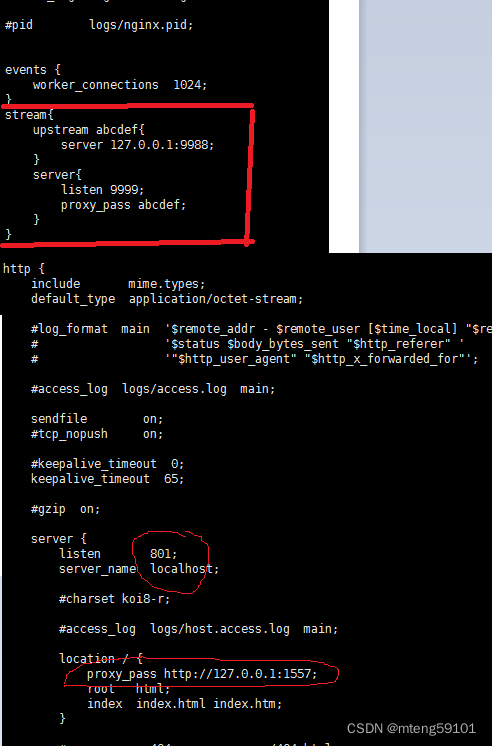
如图,在events和http块之间插入 代码段stream,用来转发socket
stream{
    upstream abcdef{
        server 127.0.0.1:9988;
    }
    server{
        listen 9999;
        proxy_pass abcdef;
    }
}
http服务转发是http内部的server内的location
五、启动nginx
cd /usr/local/nginx/sbin
./nginx
ps -ef|grep nginx
这样就可以通过9999端口访问原来发布在9988端口的socket服务
通过801端口访问原来发布在1557端口的http服务
[root@localhost ~]# curl http://192.168.137.141:801/multiply?a=3&b=4
{"res": "12"}[root@localhost ~]# curl http://192.168.137.141:801/add?a=3&b=4
{"res": "7"}[root@localhost ~]# curl http://192.168.137.141:1557/multiply?a=3&b=4
{"res": "12"}[root@localhost ~]# curl http://192.168.137.141:1557/add?a=3&b=4
{"res": "7"}[root@localhost ~]#
总结
以上为个人经验,希望能给大家一个参考,也希望大家多多支持IT俱乐部。